







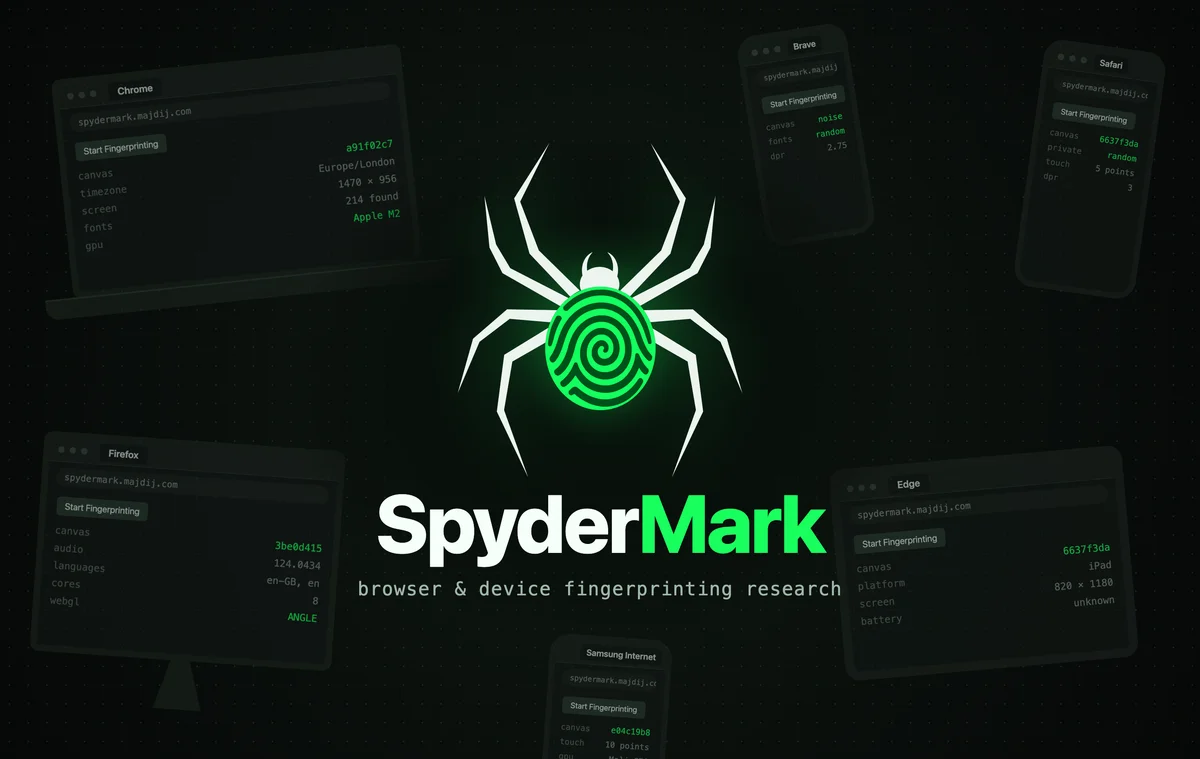
SpyderMark: Researching How Websites Recognise Your Device
What I learnt from a summer of building a browser fingerprinting research tool from scratch
Every time you visit a website, your browser hands over a surprising amount of information about the device it's running on. Your screen size, your time zone, the fonts you have installed, the way your graphics card draws an image, and hundreds of other small details. None of these identify you on their own, but put enough of them together and a website can often recognise a device it has seen before, even after you've cleared your cookies.
This is called browser fingerprinting. Banks, ticket sellers and online services use it to spot fraud, bots and people abusing free trials. It's also the reason privacy-focused browsers like Firefox, Brave and Safari now try to block or scramble these signals.
Over summer 2026 I spent my spare time building SpyderMark, a research project to find out how well fingerprinting actually works. I could have just read about it, but I wanted to build the whole thing myself: collect the signals, store them, and test how reliably they can tell devices apart.
Table of Contents
What I wanted to find out
I started with a handful of questions:
- Which signals stay the same on one device over time, and which ones change?
- Can a device still be recognised after its cookies are cleared, or in a private window?
- Can you tell two different devices apart, especially two phones from the same manufacturer?
- How do you measure all of this honestly, rather than trusting that it looks about right?
The practical reason behind it was abuse prevention. If you run a service with a free tier, you need some way to notice when the same person keeps making new accounts to get around the limits. Before ever relying on fingerprinting for that, I wanted to understand what it can do and where it falls down.
Research first, code second
Before writing any code I put together a catalogue of around 460 possible data points. I scored each one on things like how often it naturally changes, whether it stays the same across different browsers, how easy it is to fake, and how much it narrows down who you are. I also wrote up how a comparison engine should weigh evidence depending on context. For example, battery level is useful when two visits are minutes apart, and useless when they're a day apart.
My first version, built in June, was a quick prototype with accounts, an admin panel and a QR code pairing flow. It taught me a lot about what I needed, so in July I started again from a clean slate with a much clearer plan and a roadmap split into phases.
How I built it
The project has three main parts.
The collector runs in the browser. It's written in plain HTML, CSS and JavaScript with no framework, with one module per category of signal (screen, fonts, audio, graphics, hardware and so on). It collects around 400 signals, and each one records whether it worked, wasn't supported, errored or timed out, because "this browser blocked it" is useful information too.
A Cloudflare Pages Function sits between the browser and my server. It adds network-level signals that only the server side can see, such as request headers and connection details, then forwards everything to the backend with a shared secret.
The backend is a Node.js server and a PostgreSQL database running in Docker, on a Proxmox virtual machine on my own server. It's reached through a Cloudflare Tunnel, so there are no ports open to the internet. Deploys are automatic: pushing to GitHub builds a new image with GitHub Actions, and the VM checks for it every minute and updates itself.
The most important feature, though, was labelling. You can sign in and file each scan under the real device, operating system (including virtual machines) and browser profile it came from. For devices you can't easily sign in on, like a games console or a TV, you can generate a six-digit capture code (or scan a QR code) and the scan gets filed for you.
Without that labelling, any accuracy figure would be a guess. With it, every pair of scans has a known answer: same device or not.
What the data showed
By the end, I had 98 labelled scans from eight devices in my household. That works out to about 4,700 pairs of scans to compare, and a few results stood out.
Fingerprints survive a cookie clear. I scanned a device, cleared its cookies, and scanned it again. 351 out of 365 signals came back identical (96.2%). The ones that changed were all signals I had already flagged as naturally volatile, and the heavyweights (canvas, audio, graphics, fonts and hardware) didn't move at all. Along the way I found that a few "unstable" signals turned out to be my own bug: lists from the browser were coming back in a different order each time, and sorting them fixed it.
Telling devices apart is much harder than recognising one. The simple approach of counting how many signals match let 11.2% of pairs from different devices score higher than any pair from the same device. The two Google Pixel phones were the most commonly confused.
Safari was the hardest browser to pin down. On iPhones and iPads, every device drew exactly the same canvas image, whichever browser I used, so one of the strongest signals couldn't tell them apart at all. On top of that, Safari's private mode scrambled its drawing-based signals every session, on both the Mac and the iPhone. Chrome and Edge on the same iPhones didn't, so recognising a device in a private window only failed in Safari.
The most useful signals are often the least stable. The signals that are best at telling devices apart tend to be the ones most likely to change between visits. A single "importance" score per signal can't capture that.
Weighing evidence properly made a big difference. I tried two weighted approaches. Weighting by the roles I had given each signal in my own design document made results worse, which was humbling but useful to know. Weighting by log-likelihood ratio, which asks "how much more likely is this match (or mismatch) if it's the same device?", worked much better. It cut the balanced error rate from 14.15% to 9.97%.
To make sure those numbers meant something, I measured results on a four-step ladder (same browser, different browser, different operating system on the same device, different device) and ran device holdout tests to check the results weren't just tuned to the particular devices I had.
What I learnt
Most of what I took away from SpyderMark goes beyond fingerprinting:
- Build the measuring tool before the thing you're measuring. I built the evaluation harness before writing a real matcher. That meant my first idea for an improvement could be tested and shown not to work, instead of just being assumed to help.
- Check that your checks are checking the right thing. For a few weeks my deploy script reported success while the server was still running old code. It was checking the server was healthy, and the old version was perfectly healthy. Now it checks that the running version is the one it just downloaded.
- Never edit the raw data. When a scan looked wrong, the fix was always to correct its label or annotate it, never to change what was collected.
- Know the limits of your data. Eight devices from one household, with no two of the same model, is a small sample. I wrote that caveat down at the start, and it shaped how much I trusted every number.
- I picked up real infrastructure skills. I set up a Proxmox VM, Docker, Cloudflare Tunnel, a CI/CD pipeline, database migrations and a secure account system with hashed passwords and CSRF protection, all things I'd only read about before.
It also changed how I see my own browser. Seeing how much a normal browser gives away, and how browsers like Brave randomise signals to fight back, made me take the privacy side a lot more seriously.
Where SpyderMark is now
I stopped working on SpyderMark in September. To be honest, it wasn't giving me the results I wanted. Safari kept making it hard to match scans back to the right device. At the same time, my final year at university was starting, along with my final-year project, WandStack, and that's where my time needed to go.
I'm still happy with where it got to: a working pipeline, a labelled dataset, an evaluation harness, and a scoring approach that clearly beats the simple one. The next step would have been a live matcher, and doing that properly needs far more devices than one household can provide, plus a real answer to Safari.
In November I retired the live service. The demo page still works, but nothing is sent to the server any more and accounts are closed.
Try it yourself
The demo is still live at spydermark.majdij.com. Press the button and you can see what your own browser gives away. The project is no longer collecting data, so nothing you submit is stored.
If you're interested in fingerprinting or fraud prevention, or just want to chat about the project, get in touch through the Contact form on my main MajdiJ.com page.